Shoptimised gives you the tools to audit, enrich, optimise and manage your product feeds at scale, helping platforms better understand your products and giving more of your catalogue the data it needs to perform.
Build powerful feed rules, uncover optimisation opportunities and distribute better product data across every channel from one platform, without relying on developers.
Helping ecommerce brands grow
Managing product data at scale, every day
Keeping product information fresh and up to date
Product feed optimisation is the process of improving the product data sent to Shopping platforms, marketplaces, social commerce, affiliate networks and other marketing channels so your products can be better understood, matched and surfaced.
Better product data gives platforms more accurate information about what you sell, helping them understand each product and where it is most relevant.
Feed optimisation focuses on improving the data behind your products. It does not replace bidding, budgeting or campaign management. It gives every channel better product information to work with.
Every platform can only work with the product information you give it.
If important information is missing, inaccurate or poorly structured, platforms have less context to understand what you sell, where products belong and when they should be surfaced.
As product discovery becomes increasingly driven by AI, the quality of the data describing your products matters more than ever.
Search engines, Shopping platforms, marketplaces and AI-powered experiences rely on product information to understand what an item is, how it should be categorised and when it could be relevant.
Feed optimisation helps turn incomplete or inconsistent catalogue data into richer, more structured product information that machines can interpret more effectively.
Enrich titles, descriptions, attributes, product types, categories and identifiers with the information needed to describe each product more accurately.
Turn inconsistent or incomplete source data into structured, reliable product information that can be distributed wherever your products need to appear.
Create a stronger product data foundation at source, then distribute that enriched information across search, Shopping, marketplaces, social commerce and emerging AI-led discovery experiences.
Manage, optimise and distribute your product feeds from one platform.
Shoptimised combines product feed management with advanced feed optimisation, giving ecommerce and performance teams greater control over the product data powering their channels.
Connect your product data, manage multiple feeds and keep your channel outputs accurate and up to date.
Improve titles, attributes, identifiers, categories and product types using audits, suggested optimisations and reusable feed rules.
For Google Shopping, bring product-level Google Ads signals into your feed strategy. Use advertising performance alongside attributes.
Build and manage product feed rules without code or replatforming. Your marketing or performance team stays in control.
One workflow takes you from raw product data to enriched, optimised feeds ready for the channels your business uses.
Your team stays in control of what changes and when.
01
Connect your ecommerce platform, feed URL, file or spreadsheet.
Already have feeds running? Start with your existing product data and improve it rather than rebuilding everything from scratch.
Explore Product Feed Creation →02
Automatically review titles, descriptions, identifiers, attributes, categories and product types.
Instead of another list of hundreds of warnings, Shoptimised helps your team identify what is worth addressing first.
Explore In-Platform Feed Auditing →03
Create reusable IF/THEN rules to clean, enrich and restructure product data at scale.
Rules run automatically when your feed refreshes, so new products benefit without repeating the work manually.
Build as many optimisation rules as you need. Your pricing does not increase based on rule count.
Explore Feed Rules →04
Use suggested optimisations and feed insights to identify opportunities across your catalogue.
Turn approved suggestions into reusable rules so improvements continue to apply as your catalogue changes.
Explore Suggested Optimisation →05
For Google Shopping, connect Google Ads and combine performance data with product attributes.
Create labels, reporting groups and performance-led feed rules to help your team understand what is working and where attention is needed.
Explore Performance Rules →06
Create multiple channel outputs from one managed product source.
Map your optimised product data to the fields required by each destination without rebuilding the feed every time you add a channel.
Explore Multi-Channel Distribution →Getting a feed live is only the beginning.
Shoptimised gives your team the tools to actively improve the data behind product performance, combining feed management, advanced optimisation logic, auditing, multi-channel distribution and product-level performance signals in one platform.
| Basic Feed Management |

|
|
|---|---|---|
| Feed Creation & Management | Basic Feed Management Create and format feeds for different channels. | Shoptimised Create, manage, optimise and distribute feeds from one platform. |
| Feed Rules | Basic Feed Management Simple data replacement and IF/THEN rules, often with limits based on plan. | Shoptimised Advanced feed rules, dynamic logic and regex capabilities without code, with unlimited optimisation rules. |
| Product-Level Performance Data | Basic Feed Management Product data and advertising performance remain separate. | Shoptimised Connect Google Ads data with feed attributes to build performance-led rules and product segments. |
| Feed Auditing | Basic Feed Management Identify basic errors or formatting issues. | Shoptimised Automatically audit product data and identify prioritised optimisation opportunities. |
| Refresh & Caching | Basic Feed Management Refresh schedules vary by platform. | Shoptimised Four daily refreshes with a 7-minute average cache time. |
| Catalogue Scale | Basic Feed Management Product limits or additional costs may apply as catalogue size grows. | Shoptimised Unlimited products per feed on every plan. |
| Optimisation Rules | Basic Feed Management Rule allowances or higher pricing tiers may restrict how much you can optimise. | Shoptimised Unlimited optimisation rules, so you are not charged more for doing more with your data. |
| Specialist Support | Basic Feed Management Support can be limited to standard platform or ticket-based assistance. | Shoptimised Onboarding and ongoing access to product feed specialists are included. |
| Premium Google CSS | Basic Feed Management May require a separate CSS provider. | Shoptimised Premium Google CSS included on every plan, within documented Google CSS policy. |























Whether you manage your own ecommerce catalogue or product feeds across multiple clients, Shoptimised gives your team the tools to manage and improve product data at scale.
Manage and optimise the feeds powering your ecommerce channels without relying on development resource for every change.
Reuse suitable rules and optimisation processes across client accounts. Give performance teams greater control over product data.
Your catalogue can grow without your SKU or rule count pushing you into a more expensive plan.
Unlike platforms that increase costs based on catalogue size or the number of optimisation rules you create, Shoptimised does not charge you more for adding SKUs or building more rules.
Choose the number of feeds and users your team needs, with unlimited products per feed, unlimited optimisation rules and access to every supported output channel.
For in-house teams and small agencies managing a handful of feeds.
For growing brands and agencies managing multiple clients or channels.
For larger catalogues and agencies that need more feeds, users, and control.
For high-volume brands and agencies running feeds across multiple accounts.
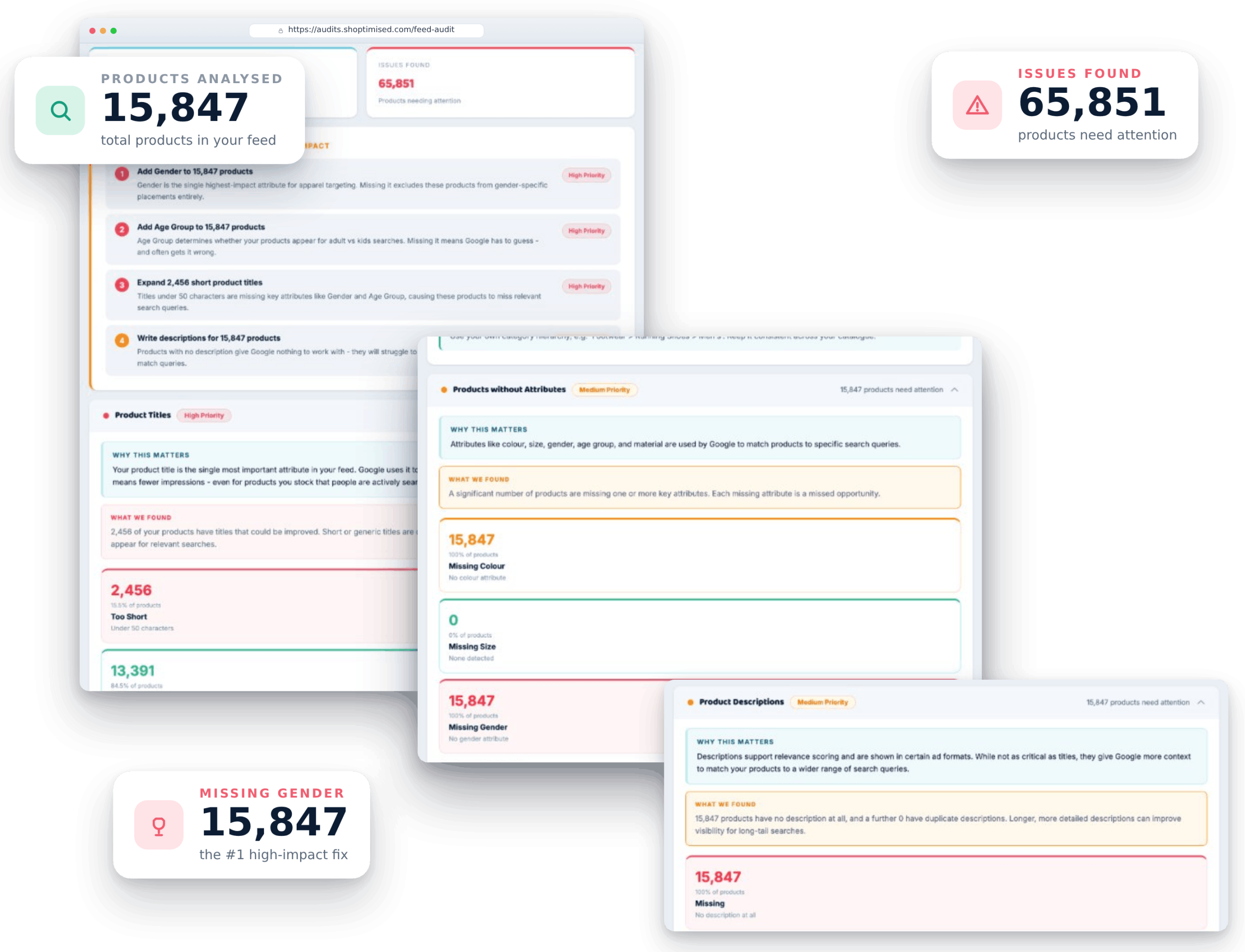
Not sure where to start?
Run a free Product Feed Audit to uncover missing attributes, weak titles, identifier issues, category problems and other opportunities across your catalogue. See what needs attention, how much of your catalogue is affected and where your team should focus first.
No commitment. Clear, actionable findings.
See how retailers and agencies are using Shoptimised to take greater control of their product data and performance.
Your team controls the feed. Our team is there when you need us. Shoptimised gives you the freedom of self-service software without leaving you to figure everything out alone. From onboarding and feed setup to complex rules and optimisation challenges, our UK-based team is there to help you get more from the platform.
You speak to people who understand product feeds, not a generic support desk.
Get hands-on help connecting your product source, configuring your feeds and getting your team confidently up and running.
Need help with a rule, feed issue or optimisation challenge? Speak to specialists who work with product data every day.
Our involvement does not stop after onboarding. Get ongoing help as your feeds, channels and requirements evolve.
Not every team wants another platform to manage. If you do not have the time, resource or in-house feed expertise to manage optimisation yourself, Feed Accelerator gives you a fully managed alternative.
Shoptimised specialists can audit, optimise and maintain your product feed for you.
Product feed optimisation improves the quality and structure of the data Google uses to understand your products. Improving areas such as titles, categories, product types, attributes and identifiers can help products appear for more relevant searches and reduce issues that may be limiting visibility. Shoptimised also uses feed audits and suggested optimisations to highlight the areas that are most likely to need attention first.
No.
You just need a product data source. That could be a platform connection (like Shopify), a feed file or URL (XML, CSV, JSON), or a Google Sheet.
If you already have a feed in your Merchant Center, we can still work from your existing product data and help you improve it.
Product feed optimisation is the process of improving your product data so it performs better in Google Shopping. That includes titles, descriptions, attributes, categories, product types, and overall structure.
Better product data helps Google understand your products more clearly, which can improve visibility and performance.
No.
Our rule builder is designed for marketers and media buyers, so you can create and apply feed rules without writing code.
If you can follow simple logic, you can make meaningful feed changes quickly.
You can create IF/THEN rules to edit and improve product data at scale. Common examples include rewriting titles, mapping categories and product types, fixing attributes, setting custom labels, and excluding products that should not be advertised.
Rules can be applied across thousands of SKUs, so you’re not stuck editing data one product at a time.
Getting the foundations right. That means clean, consistent titles, correct categories and product types, complete attributes (like GTIN where available), and a structure you can scale.
Once the basics are solid, optimisation becomes easier to maintain and much easier to measure.
The feed audit flags common data issues that can hold back Google Shopping performance, including weak product titles, duplicate descriptions, missing attributes, GTIN gaps, category issues, and shallow product type structure.
It’s designed to highlight the biggest opportunities first.
Suggested optimisations are prioritised recommendations from the audit and platform insights. They highlight what is most likely to improve Shopping performance first, such as title improvements, missing attributes, GTIN gaps, category and product type structure, and duplicate or low-quality data.
The aim is to give you quick, auto-created rules to instantly improve your product feed.
Performance rules use Google Ads product-level signals to help you make better decisions in your feed and campaign structure.
For example, you can flag products that are spending but not converting, label winners and underperformers, or group products into tiers so you can control budget and reporting more clearly. What we can do depends on the data available in your setup.
Missing attributes, weak titles, incorrect categories, identifier gaps and inconsistent product data can all limit the information Shopping platforms have to work with.
Run a free Product Feed Audit to see where your feed needs attention, how widespread the issues are and which optimisations your team should prioritise first.

